I’m defining herdr as a terminal multiplexor built around agents. If you’re running multiple agents across different projects, a dedicated space to keep tabs on all of them is pretty darn nice. In this post I share how I ended up back in a multiplexor, two years after ditching tmux, and how I’ve wired it up with Ghostty and CodeCompanion.
Important
This post was written by me and only me. An LLM checked my spelling and grammar
How I’m coding in 2026
I dumped tmux two years ago when I moved from Kitty to Wezterm. Wezterm’s multiplexing made it a no-brainer as I could drop another dependency. Then I moved to Ghostty (yes, this makes me sound like I can’t settle on a config) and didn’t fancy dusting off my old tmux config. Redesigning my statusline, hunting for colours and glyphs, checking my “sensible tmux defaults” were still sensible - all super off-putting. Truth is, I only ever used tmux to sessionize: following ThePrimeagen’s approach of scripting tmux sessions into an fzf menu for fast switching. So, no multiplexor, no sessionizing.
Meanwhile, I’ve been using agents more and more. CodeCompanion.nvim has reached a point where I’m getting output as good, if not better, than Claude Code. Its versatility means I can use it for tasks beyond coding with great results too. As an aside, if you’re not making use of the Prompt Library, you’re missing out.
I trust CodeCompanion enough to let an agent make a first pass at a fix or feature, along with the tests. Now that code reviews are part of the workflow, reviewing an agent’s edits line by line is trivial. Before that, I’d switch branch in the CodeCompanion repo and run nvim to test things out. Despite endless videos and the YouTube algorithm telling me git worktrees would help, I ignored them…until last month. One edit to my init.lua file:
local codecompanion_worktree = vim.fn.getenv("CODECOMPANION_WORKTREE")
if codecompanion_worktree == vim.NIL then
  codecompanion_worktree = "main"
else
  vim.schedule(function()
    vim.notify("Using worktree `" .. codecompanion_worktree .. "`", vim.log.levels.INFO, { title = "CodeCompanion" })
  end)
end
vim.cmd(string.format("set rtp+=%s", om.home .. "/Code/Neovim/codecompanion.nvim/" .. codecompanion_worktree))
Followed by nvimcc feature-a, and I can open Neovim with the feature-a worktree of CodeCompanion ready to go. It’s a huge time saver and means I can use the stable main, while I build out a fix or feature. I use lazygit to create and switch between worktrees and branches.
I still need to blog about how I’m really using agents in H2 of 2026, but needless to say I’m jumping between Ghostty windows, tabs, and Neovim instances. If an agent finishes analysing a financial report or reviewing a feature I’ve crafted in CodeCompanion, I only find out when I manually navigate to that window and tab.
herdr’s value proposition
It’s not my intention to steelman herdr here. Plenty of YouTube and Reddit posts do that better than I can in a single blog post. Instead, I want to focus on what I saw as herdr’s value proposition when I first discovered it, and how I see it after a week of use.
When I saw Typecraft’s video on herdr, my immediate thought was “surely this is just tmux with a dedicated panel for your agents”. Having used it for a week, I can confirm that’s exactly what it is. Oh, except it’s written in Rust.
That’s not a dig. I’ve used it for a week and it’s now an integral part of my workflow. It handles git worktrees nicely, displaying them in the spaces panel like so:
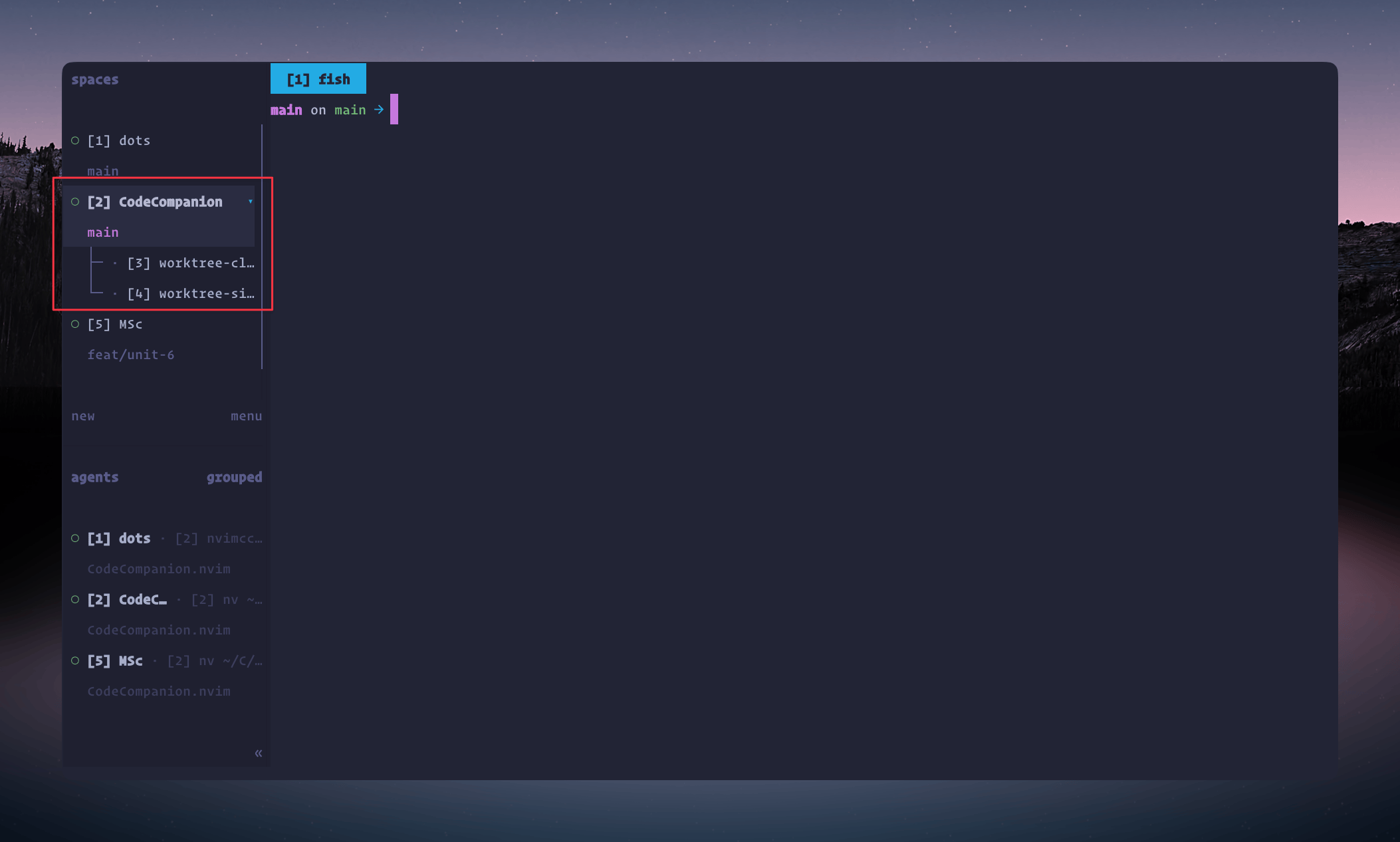
What’s odd is that this was a random discovery with prefix+G. Nowhere could I find it in herdr’s quick start guide. To me, this is a huge feature, and I’m sure it would be for many others. Being able to cycle between worktrees with ease and jump to a worktree’s agent?! Up until this point I was using Lazygit to create, manage and switch worktrees. But herdr can do this and show them as children of a space?! Huuuuuuge!
Now, showing herdr in action:
Keep a keen eye open on the bottom left and you’ll see the agent status indicator go from yellow (“working”) to hollow green (“done”). If you’re not in the window when an agent needs you, you’ll see the indicator turn “red” and you’ll get a notification if your agent supports it:
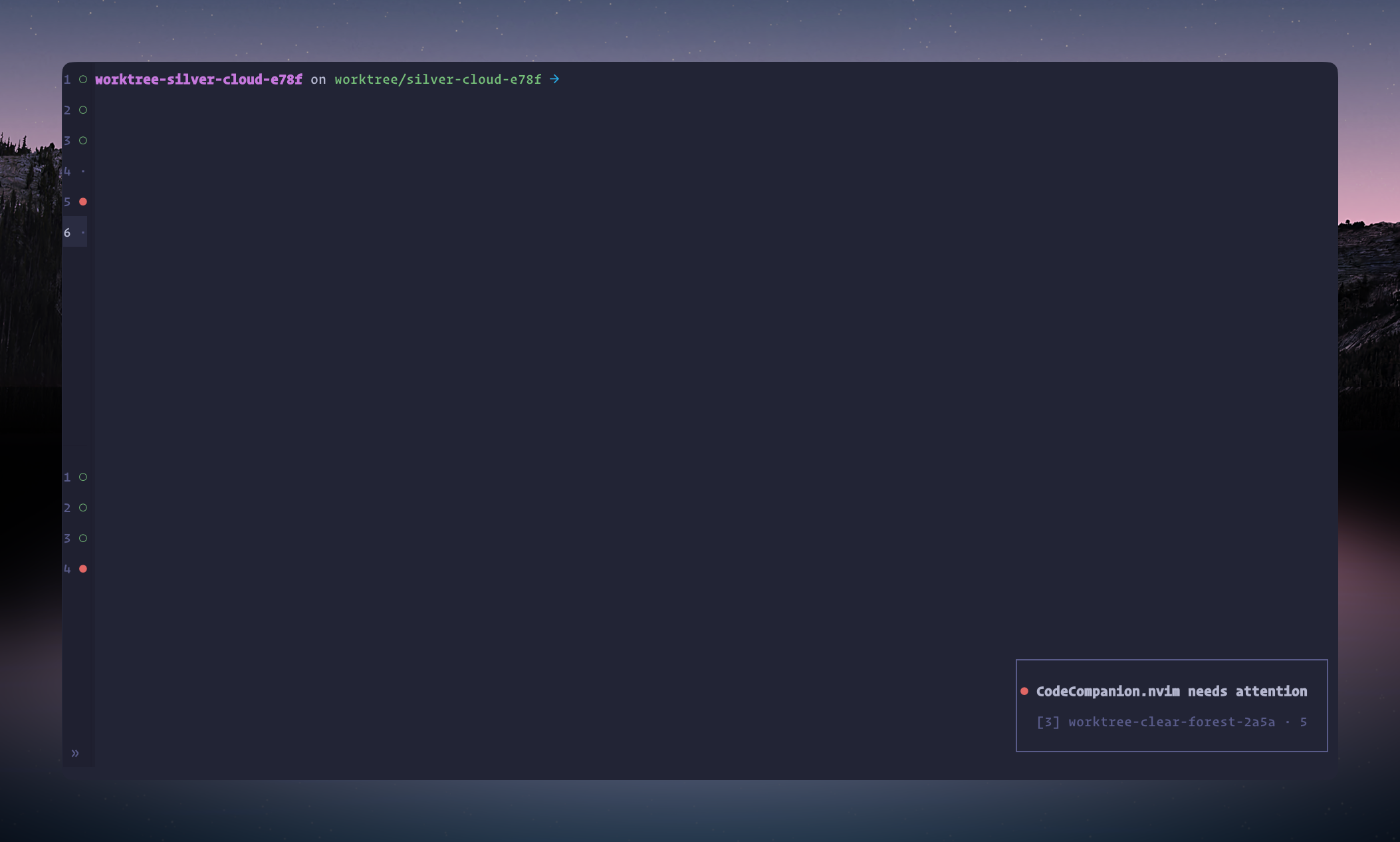
For my way of working, sans multiplexor, this is pretty darn nice. Throw in herdr’s impressive plugin ecosystem (where I finally got my sessionizer back) and you have one compelling application. But the logical next question was…
Tmux users: Is herdr just a shiny new thing?
Ultimately, this was the question I was wrestling with throughout.
Is herdr differentiated enough from tmux so that it’s anything other than that “shiny new thing”? Or, if I have tmux already, is it worth migrating?
herdr very much is the shiny new thing, and honestly, I don’t think it’s worth migrating for. Especially since someone’s already built workmux, giving tmux its own agent panel and git worktree support. If you have a tmux workflow you’re happy with, plus muscle memory to boot, it’s not worth uprooting for herdr. At least not yet.
So why have I moved to herdr? As I said above - no desire to dust off that old tmux config (which ran across multiple files). I’m essentially net new to multiplexing and feel like I got my miles out of tmux. I do want that shiny new thing this time round and given my open-source work these days is building agentic dev tooling, I feel like I should.
My herdr and Ghostty setup
With that decision made, I added support to CodeCompanion to get those nice agent status indicators and notifications. The last step to feeling fully integrated with herdr was getting Ghostty to play nicely with it.
From my prior post, you’ll know I blooming love Ghostty. It’s been my terminal since the start of December and nothing but a joy to use. But now I’m back to multiplexing, a ton of Ghostty’s features no longer make sense - windows and tabs, mainly. So re-routing my muscle memory to herdr via keymaps was where I started.
Important
After a week of use, it’s worth clarifying how simple herdr is to configure. My tmux config ran for pages - a monster of options and settings needed to get it playing nicely with my terminal and Neovim. herdr, on the other hand, is so damn simple.
Oh, and before I forget, you can see my full herdr and Ghostty config over in my dotfiles.
Thinking horizontally
First up: how do I want to move around in herdr? I started with tabs. Since herdr displays tabs much the same way Ghostty does, I wanted to cycle between them with Ctrl+Tab or jump to specific ones with Command+n (where n is a number) - essentially mimicking macOS behaviour.
To my herdr config, I simply added:
next_tab = "ctrl+tab"
previous_tab = "ctrl+shift+tab"
switch_tab = "cmd+1..9"
For my Ghostty config, this is where the first of many challenges appeared. Ghostty can unbind a key combination, so I tried setting keybind = ctrl+tab=unbind and keybind = ctrl+shift+tab=unbind. Nothing. Turns out I needed the raw escape sequence, which CodeCompanion with Sonnet-5 duly delivered:
keybind = ctrl+tab=text:\x1b[9;5u
keybind = ctrl+shift+tab=text:\x1b[9;6u
Now for the Command+n keymap. I wrongly assumed keybind = cmd+1=unbind and keybind = cmd+2=unbind etc. would work. Nothing. Cue a period of trial and error with CodeCompanion. Eventually we settled on:
keybind = cmd+1=unbind
keybind = cmd+digit_1=unbind
...
keybind = cmd+9=unbind
keybind = cmd+digit_9=unbind
Note
I spent a good 20 mins searching GitHub for other people’s herdr and Ghostty setups. I couldn’t find any. I wonder if anyone has even made theirs public yet. So with no GitHub, Google or Stack Overflow and unable to find it in the docs, where do you turn? In the old days, to the source code. Trawling hours looking for some obscure reference that would unlock a single keymap. Not exactly time well spent…CodeCompanion and Sonnet-5, took about 3 mins of back and forth.
Thinking vertically
As I mentioned, herdr has a beautiful left-sided pane housing workspaces and agents. Given they’re stacked on top of each other, adding vertical movements with j and k felt logical:
next_workspace = "cmd+j"
previous_workspace = "cmd+k"
I also thought it’d be cool to move between agents too, so:
next_agent = "cmd+shift+j"
previous_agent = "cmd+shift+k"
Surprisingly, in Ghostty, to enable all four of those mappings, I only needed to set:
keybind = cmd+shift+j=unbind
keybind = cmd+shift+k=unbind
Other mappings
To bring this closer to macOS, I also added the following keymaps to my herdr config:
new_tab = "cmd+t"
close_tab = "cmd+w"
new_workspace = "cmd+n"
toggle_sidebar = "cmd+s"
Updating my Ghostty config to:
keybind = cmd+t=unbind
keybind = cmd+w=unbind
keybind = cmd+n=unbind
Again, cmd+s didn’t need to be unbound.
The key point with these mappings: I don’t have to change my muscle memory. I’ve simply mimicked the way I use Ghostty, in herdr.
I should point out that I keep the sidebar collapsed most of the time. This just leaves the status icons next to the workspace and agent numbers.
Other settings
I like my prefix key to be:
[keys]
prefix = "ctrl+v"
I find it more ergonomic. I’ve also set my sessionizer to:
[[keys.command]]
key = "ctrl+w"
type = "plugin_action"
command = "sessionizer.pick"
description = "fuzzy-switch workspace"
My current gripes with herdr
herdr is by no means perfect and there are a few rough edges that annoy me. For me, it’s integral that I can rice an app to my liking so it blends into my terminal and Neovim. There are some theming issues in particular I hope they sort out soon.
Custom themes
herdr only lets you define a custom theme by manually adding colours to your config. You can’t link to external custom themes like you can with Ghostty or Wezterm. I’ve raised this as a feature request.
Custom light/dark themes
In your herdr config you can only specify one theme, so you have to choose between light OR dark. Thankfully, #2324 will close that gap once merged. Still, this was a heck of a miss, especially given they’ve already built in a theme auto switch.
Navigating spaces and worktrees
There’s also a weird issue: when the spaces panel (on the left) is open, I can move sequentially through everything using my <cmd+j> keymap. Collapse it, though, and the sequencing changes:
I can’t believe this is by design. Very odd.
Summary
Is herdr just a tmux rewrite for the agentic age? I don’t know - I’ve not looked at the code. Feature-wise, though, it’s damn hard to tell the two apart, especially if tmux has workmux installed.
So my recommendation is:
If you have tmux installed, don’t bother with herdr. If you don’t have tmux installed and you work with multiple agents, then out of the box, herdr is going to give you a fantastic experience.
I think we’re living in a golden age of software development. Developers who were highly skilled prior to the arrival of LLMs are producing fantastic software at a rate of knots. If you stay with tmux or pickup herdr, just make sure it allows you to do the same.