I was getting lost in GitHub noise. 20+ notifications every morning, endless triage, and minimal time to write code. So I built some AI agents in n8n to automate issue and PR triaging for CodeCompanion.nvim. The result: fewer pings, faster resolutions, and reclaimed hours to focus on writing code and shipping features.

TL;DR
I automated GitHub issue and PR triaging for CodeCompanion.nvim using AI agents in n8n. One agent reads issues, checks them against my guidelines and a minimal.lua config, then provides feedback or closes low-effort submissions. Another agent labels PRs by priority (P1-P4) based on their impact and urgency. Combined, these agents save me roughly 2-2.5 working days per year and let me focus on actual development instead of endless triage.
The Problem
I’d regularly wake up to 20+ GitHub notifications on my phone from all the activity that happened on CodeCompanion.nvim while I was sleeping. It had gotten to the point where it felt like too much. I have a day job and other hobbies, so my window for open source contributions has to be time-boxed.
The challenge was that the signal-to-noise ratio in the repo was becoming overwhelming. And I was the key enabler of that. I would respond to EVERYTHING, and in some detail too. Someone asks about LLM benchmarks? I’m in there, giving my two cents. Someone finds a bug on a Saturday morning? On it and fixed by late morning. That was my mentality.
I don’t have figures that show how it impacted my CodeCompanion productivity, but below are some interesting data points from the last month:
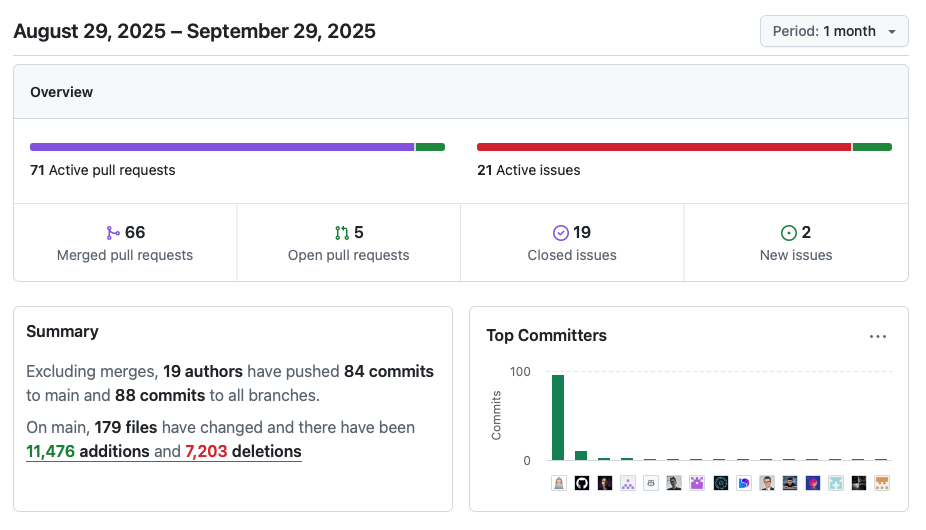
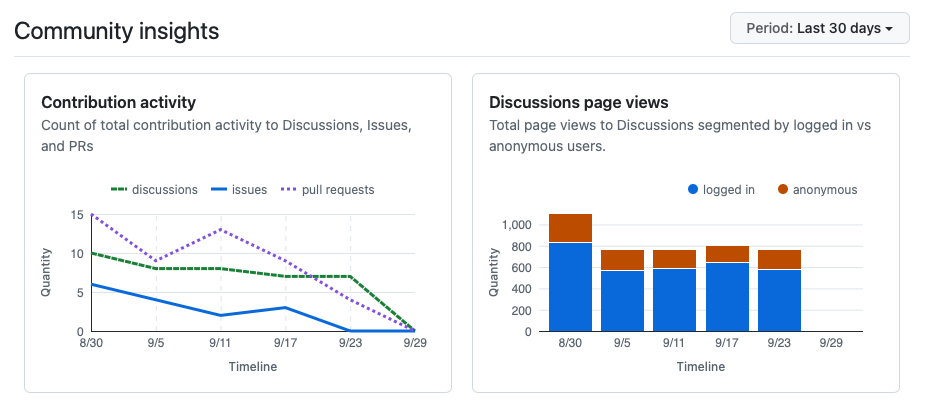
Up until a couple of months ago, my productivity had dipped significantly. I doubt I was anywhere near the levels in the images above. I might have spent the same amount of time on CodeCompanion, but I wasn’t writing code. And I certainly wouldn’t have gotten close to 100 commits in a month (especially with a wedding and a weekend away with family like there was in the period in question).
Essentially, it felt like I’d reached a point where I was just a code reviewer and troubleshooter. Honestly, I just wanted to write code and solve interesting problems.
Reducing the Noise
Around June/July, the first big step was to turn off notifications for discussions. I still reply a lot, but it’s far less frequent and on my time. No need for constant pings.
The second thing I did, which makes up the bulk of this post, was to build some automations for issues and pull requests using n8n. This allowed me to offload a huge chunk of thinking, reviewing, and triaging to an agent.
What’s left is real issues and PRs. Regarding the latter, I’ve made peace with the fact that unless they fix bugs or advance the roadmap, I shouldn’t put myself under pressure to get to them ASAP.
Using n8n to Automate GitHub
If you’re unfamiliar with n8n, it’s a web-based automation platform that lets you create workflows leveraging LLMs. I work in automation and am always keen to see what the competition is doing. And n8n is very impressive. I self-host my own n8n instance in a Docker container on Digital Ocean. It costs me about $4 a month and has been 100% reliable.
Out of the box, it has a ton of integrations and triggers. Especially GitHub triggers.
Triaging GitHub Issues
At the time of writing, I’ve had 279 issues opened in CodeCompanion. Which is super low for a plugin that gets about 5,000 unique clones a week. “Hang on, Oli, a minute ago you were moaning about all the notifications you get.” That’s because I direct a lot into discussions. Enhancements? Let’s talk about it in discussions. Unsure about your config? That’s a you problem, not a CodeCompanion one, but I’m happy to try and help you in discussions.
I dislike how most GitHub repos treat issues like a graveyard. Most don’t have any process for cleaning them up. If something has been open for 12+ months, are you really going to fix it? Just be honest with users, mark it as “won’t fix,” and reflect it as a limitation in your docs.
But I’ll reserve my biggest pet peeve for people who make zero effort when raising issues. The sort that take multiple back-and-forths to either understand the problem or try and recreate it. I’m pretty sure most people who have tried to raise an issue in CodeCompanion will say my issue template is onerous. And that’s not by chance. It’s an absolute aim of mine to be able to one-shot the issue into a config that lets me recreate it. I’ve been told it “puts people off raising an issue.” That may well be the case. But I always think: if it’s not worth their time, it can’t be worth mine.
Anyway, that builds nicely into what I wanted to create in n8n: an agent that can triage GitHub issues.
Yep. An agent that can read an issue, try to understand it, determine if it needs more information, compare it against my guidelines and a minimal.lua file to see if I, the maintainer, will be able to recreate it. Then add a comment back to the person who raised it with feedback and next steps. And in extreme cases of zero effort on the user’s behalf, close the issue.
So I’ve had 279 issues raised in around 1.5 years. Annualized, that’s 186. Let’s apply some estimated averages here: it takes me 2 minutes to read and digest an issue, maybe another 5 minutes to try and recreate it and respond. That’s 7 minutes per issue. 186 issues = 1,302 minutes = 22 hours, which equates to 2.75 working days. But in reality, the agent is probably saving me 2-3 minutes per issue. So the net saving is probably closer to 1 working day.
Let’s take a look at the triage agent:

It’s somewhat hard to take a clean screenshot of an n8n workflow as they inevitably become very horizontal, so I’ve stitched this one together from a few. But you get the idea.
The workflow listens for issue events (1). I’ve named this “New issue created”, but in reality, this listener responds to anything happening with an issue. That’s why shortly after, I have a conditional node (2) which only cares about an issue if the action was “opened” and the issue state is “open”. Before that, I was writing data into Google Sheets to do some agent evals, but I’ve turned that off for now (3). I then fetch the minimal.lua file (4) from the CodeCompanion repo so the agent can compare the user’s config against it to see if it’s valid.
Then we get to the meat of the workflow: the AI Agent (5). The prompt is huge and I won’t share it on that basis, but it attempts to determine if the user has stayed true to the minimal.lua file and actually written an issue I can start to solve. I use a Structured Output Parser (6)—something I will add to CodeCompanion at some point—to ensure the agent’s output looks like this:
{
   "output": {
      "closeIssue": false,
      "feedback": "Thanks - your minimal.lua is near-complete and looks runnable, but I can't reproduce the bug because..."
   }
}
From here, it’s straightforward. The agent always has feedback, so that’s applied to the issue (7). But the agent can also decide whether the issue should be closed. If it thinks the user has made zero effort, or the issue is not actionable, it will close it (8). If not, it leaves it open for me to deal with later.
At this point, you may be thinking, “Why?!” Why not post the feedback and just leave it open? It’s definitely personal taste, and as I mentioned previously, I dislike having long and incomplete issues that I’ll never solve sitting open.
Labelling GitHub PRs
The second workflow I built was for labelling PRs. It’s much simpler. The idea is to get an agent to read a PR and score it from 1 to 4 based on how important it is to the repository.

It starts by listening for a PR event (1). I run some custom JavaScript (2) to extract various elements like whether it has a label already, if it’s in draft, etc. Then I fetch comments (3) and the diff (4) and format them both (5 and 6). Then it’s time to invoke the agent, and this is what I prompt it with (7):
const prompt = `
# CodeCompanion PR Labeller

You are an expert code reviewer for the CodeCompanion.nvim project. Your role is to add a label to a given Pull Request (PR) which, in turn, will help the maintainer decide where to focus their time.

## P1

A PR which is labelled as P1 has the highest priority and demands the maintainer's attention immediately. The characteristics of a P1 are:

- Fixes a showstopping or urgent bug in CodeCompanion which could be affecting the majority of users
- Links to an already open issue
- Has adequate test coverage

## P2

A PR which is labelled as P2 is the second highest priority. The maintainer should get around to this as soon as they can. The characteristics of a P2 are:

- Fixes a bug in CodeCompanion. Might not be a showstopping bug or may be an annoyance
- Adds a new feature which will be popular with the community
- May link to an already open issue
- Has some to no test coverage

## P3

A PR which is labelled as P3 is the third highest priority. It's not urgent for the maintainer to look at. The characteristics of a P3 are:

- Feature request or refactor which is substantial (>= 5 files changed/added)
- May have some to no test coverage
- May have some to no documentation

## P4

A PR which is labelled as P4 is the lowest priority. It's not urgent for the maintainer to look at. The characteristics of a P4 are:

- Feature request or refactor which is small (< 5 files changed/added)
- May have some to no test coverage
- May have some to no documentation

---

Please review the PR entitled "${title}". To support your review, I'm also sharing comments from the PR itself (if they exist) and the diff:

## Comments

${commentsText.trim()}

## Diff

${diffsText.trim()}
`;
Again, nothing too clever. Just some guidance for the agent when it reviews the PR. This is always my aim when using them. They excel at making decisions based on varied context. So I give them enough freedom to adapt to a unique dataset, but also enough structure so that my underlying aim—less PR triaging for me—is achieved.
To close off the automation, it’s just a case of applying the label (8).
In terms of impact, there have been 473 PRs opened in 18 months that aren’t related to myself or github-actions. So that’s about 315 a year. Trying to determine how much time I’m saving is tricky. I use the labels from this action to help guide my prioritization. So I’d say it saves me 1-2 minutes per PR. That’s 10 hours a year, maybe I could stretch it and say 1.25 working days.
Results
The two automations combined are saving me roughly 2-2.5 working days per year. That might not sound like much, but for a side project where time is already limited, it’s meaningful. More importantly, they’ve shifted the nature of the work. I’m no longer spending mental energy on initial triage—deciding what’s worth my time, what needs more information, or how urgent a PR is. The agents handle that upfront filtering.
The issue triage agent has processed 186 issues annually, saving about 1 working day by handling the initial review and feedback loop. The PR labelling agent has processed 315 PRs annually, saving roughly 1.25 working days by automatically prioritizing them. But the real win isn’t just the time—it’s the reduction in context switching and decision fatigue. I open GitHub now and see curated work: issues that are ready to solve, PRs sorted by priority. The noise is gone, and I’m back to doing what I actually enjoy: writing code and solving interesting problems.